Klingelbox
Die Klingel, lokal und ohne Cloud.
A 433 MHz receive / analyse / replay appliance on an ESP32-S3. It listens to your doorbell, learns its buttons, replays them, and routes every press wherever you want — another chime, Home Assistant, or both. Nothing leaves your network.
Flash it in your browser Hardware View on GitHub
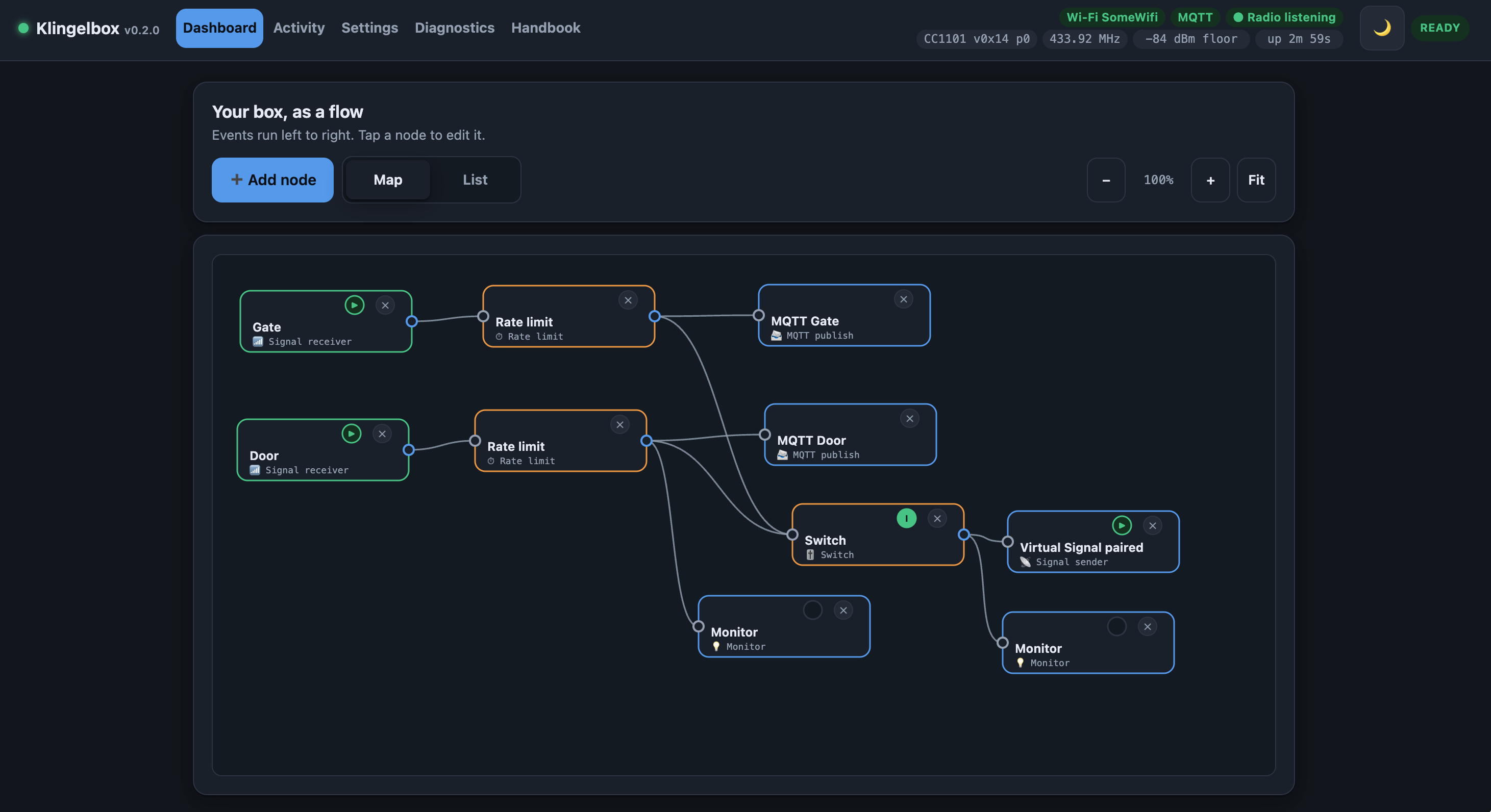
The whole box is one flow. Above: two doorbell buttons each pass through a Rate limit — so leaning on the button still rings once — and on to MQTT, a Switch you can toggle from Home Assistant, and a second chime. Monitor nodes light up as a chain fires, so you can watch it work instead of reading a log.
What it is
Klingel is German for doorbell. A Klingelbox is a small box that sits between your existing 433 MHz doorbell hardware and the rest of your house.
It is built around a wireless doorbell, but it is deliberately not a doorbell hack. The radio layer is protocol-agnostic: the CC1101 hands raw pulse edges to the ESP32-S3’s RMT peripheral, which timestamps them in hardware, and everything above that works on raw timings. Decoding (EV1527 today) is one optional plugin on top.
The practical consequence is the thing most 433 MHz projects cannot do:
A signal nobody can decode is still a first-class citizen. It can be stored, named, matched and replayed exactly like a recognised one, because what was recorded is the waveform, not a guess about its meaning.
What you can do with it
-
Register your doorbell buttons by listening: the box keeps everything it hears and ranks it, most likely first. Repetition is what does the ranking — a real remote sends the same word several times and noise never does — so a protocol nothing on the box can decode still lands at the top of the list and still works.
- See when a threshold is hiding your remote. If one press arrives cut into pieces, or a burst was thrown away for being too quiet or too short, the box says so and offers the fix, instead of showing you an empty screen.
- Replay any stored signal on demand, from the web UI, the REST API, or a node graph.
- Synthesise virtual signals so you can pair your own chimes to a code the box invented, instead of hunting for the remote’s.
- Wire it all together in a node graph: this button rings those chimes, these three all ring the upstairs one, and don’t ring more than once every 10 seconds.
- Add a wired button — a physical door switch on any free GPIO, configured in the web UI rather than compiled in, behaving exactly like an RF button.
- Publish everything to MQTT and Home Assistant, including presses from remotes you never registered.
How the pieces fit
graph LR
  RF[433 MHz burst] --> CC[CC1101 async OOK]
  CC -->|GDO0| RMT[RMT hardware edge capture]
  RMT --> N[timing normalisation]
  N --> D[decoder plugins - EV1527]
  N --> S[(signal store)]
  D --> S
  S --> G{node graph}
  GPIO[wired button] --> G
  MQTTIN[MQTT trigger] --> G
  G --> TX[signal.tx -> CC1101 TX]
  G --> MQ[sink.mqtt -> broker / Home Assistant]
The radio chain is validated on real hardware: a live unit captures, decodes and replays a real doorbell, and the replay rings the actual chime.
Getting started
- Build the hardware — an ESP32-S3 and a CC1101 module, eight wires, no level shifter.
- Flash it — either in your browser (Chrome or Edge on a desktop, nothing installed) or with
idf.py. - First boot raises a
Klingelbox-XXXXrecovery hotspot with a captive portal. Join it, enter your Wi-Fi, and the box comes back athttp://klingelbox.local. - Learn a button, then build a graph and connect Home Assistant.
Documentation
| Page | What’s in it |
|---|---|
| Hardware | Wiring, board choices, antenna and power notes. |
| Flashing | Browser flasher, idf.py, OTA — one image for every board. |
| Automations | The node graph: every node type and what it is for. |
| MQTT & Home Assistant | Topic map, payloads, discovery, recipes. |
| REST API | The complete HTTP surface — the contract between firmware and web UI. |
| Security | Threat model, the optional password and TLS, certificate pinning, lockout recovery. |
A finding worth repeating
On the bench, real presses and background noise separated like this:
| pulses | RSSI | confidence | |
|---|---|---|---|
| real press | 49–53 | −24 to −42 dBm | 67–92 % |
| AGC noise | 33–92 | −91 to −97 dBm | 24–28 % |
Pulse counts overlap — no minimum-length filter can separate them. Signal strength splits the two by ~50 dB with nothing in between, because a silent band leaves the receiver’s AGC amplifying thermal noise while a transmitter in the same room is overwhelmingly louder. An RSSI squelch at −75 dBm took the noise floor from ~13 spurious captures per minute to zero, with real presses unaffected.
Scope and honesty
- The RF chain is validated on hardware. The appliance layer (web UI, MQTT, OTA) is in active development — expect rough edges.
TX_OKmeans the transmit completed in software. The box has no receiver on the other end and deliberately does not claim that any chime reacted.- The web UI and REST API ship with no password and no TLS, by design: this is a trusted-LAN / AP appliance and must work like one out of the box. Both are one toggle away under Settings → Access & encryption — an optional password (HTTP Basic, username fixed to
admin, the web UI brings its own login screen) and optional HTTPS with a device-generated or your own certificate. They are independent, but turn TLS on if you set a password: Basic credentials on plain HTTP are readable to anyone on the LAN. Even with both on, do not expose the box to the public internet. The full reasoning — threat model, pinning, lockout recovery — is on the Security page. - 433 MHz is a licence-free ISM band, but transmit power and duty cycle limits are regional. The default TX power is deliberately modest.